
Out of arena
Where Playwright runs out of road in public SaaS
Selector-based automation runs out of road in three distinct ways on the public web:
the application surface goes opaque when working areas render to
<canvas>; the
gateway slams shut when third-party identity providers actively reject
WebDriver-controlled browsers before the SaaS even loads; and the
entire desktop arrives as pixels over WebSocket when the app is delivered
through a streamed-desktop session (Citrix HDX, VMware Blast, TSplus HTML5 RDP). Pick a
case study below.
The vendor, at scale
98%
of the Fortune 500 — on Citrix alone
Citrix advertises 100 million+ users across 400,000 organizations, 99% of the Fortune 100 and 98% of the Fortune 500. VMware/Omnissa Horizon, Microsoft AVD + Windows 365 Cloud PC, TSplus, Cameyo and Apache Guacamole all sit on top of that — every seat sees the published app as a server-side bitmap painted into the browser, not as DOM.
The category
$4.3B → $6.0B
DaaS market by 2029 (Gartner)
Gartner's 2025 Magic Quadrant: $4.3B in 2025 → $6.0B by 2029 (7.9% CAGR). Planning assumption: by 2027 virtual desktops are cost-effective for 95% of workers (up from 40% in 2019) and the primary workspace for 20%. The streamed-canvas surface is growing, not shrinking.
Killer example
43.7%
of US hospitals run Epic — virtually all delivered via Citrix
KLAS 2026: Epic owns 43.7% of US acute-care hospitals, 56.9% of inpatient beds. Epic Hyperspace ran as a Citrix-published Windows fat client at virtually every Epic shop; the Hyperdrive web-replacement migration is still mid-flight through 2026, and many sites deliver Hyperdrive itself inside a Citrix session — so the clinician's browser still sees pixels in a canvas.
Enterprise apps commonly delivered through a streamed canvas
- SAP GUI for Windows — Citrix says 40%+ of SAP customers run SAP GUI through Citrix; latency-sensitive RFC stays inside the datacentre.
- Oracle E-Business Suite Forms / JD Edwards — Java/Forms fat clients delivered via Citrix to avoid per-desktop JRE rollouts and keep WAN users responsive.
- Epic Hyperspace / Hyperdrive — the dominant US EHR, classically Citrix-published into clinical workstations and tap-and-go thin clients.
- Bloomberg Terminal — officially supported on Citrix XenApp/Workspace; standard pattern on locked-down trading floors.
- AutoCAD / Revit / SolidWorks / Siemens NX — Citrix + NVIDIA vGPU for license-floating and to keep multi-GB CAD files off engineers' laptops.
- Microsoft Dynamics GP/AX, Sage 100/300/X3, Infor M3/LN, IFS — Windows-only ERP fat clients that nobody is rewriting; Citrix/RDS is the standard delivery vehicle.
- IBM i / AS400 Access Client Solutions — green-screen and Java navigator delivered via Citrix or RDS to extend mid-range workload life.
- The TSplus public demo here — same HTML5 RDP plumbing (canvas + WebSocket), just unrestricted access for proof.
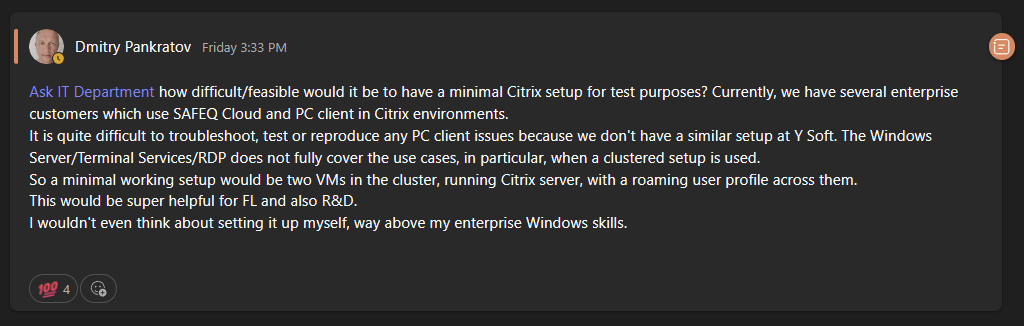
Y Soft internal Slack, May 2026. A colleague asks IT for a minimal Citrix lab because "we have several enterprise customers which use SAFEQ Cloud and PC client in Citrix environments" and we can't reproduce their issues without a comparable setup — plain RDP / Terminal Services doesn't cover clustered Citrix with roaming profiles. This is the streamed-desktop surface viewed from inside a vendor whose customers deploy through it: the same canvas plumbing that breaks Playwright is also where our own support tickets land.
Live demo
Drive an enterprise app streamed as a browser canvas
Streamed desktopGoal
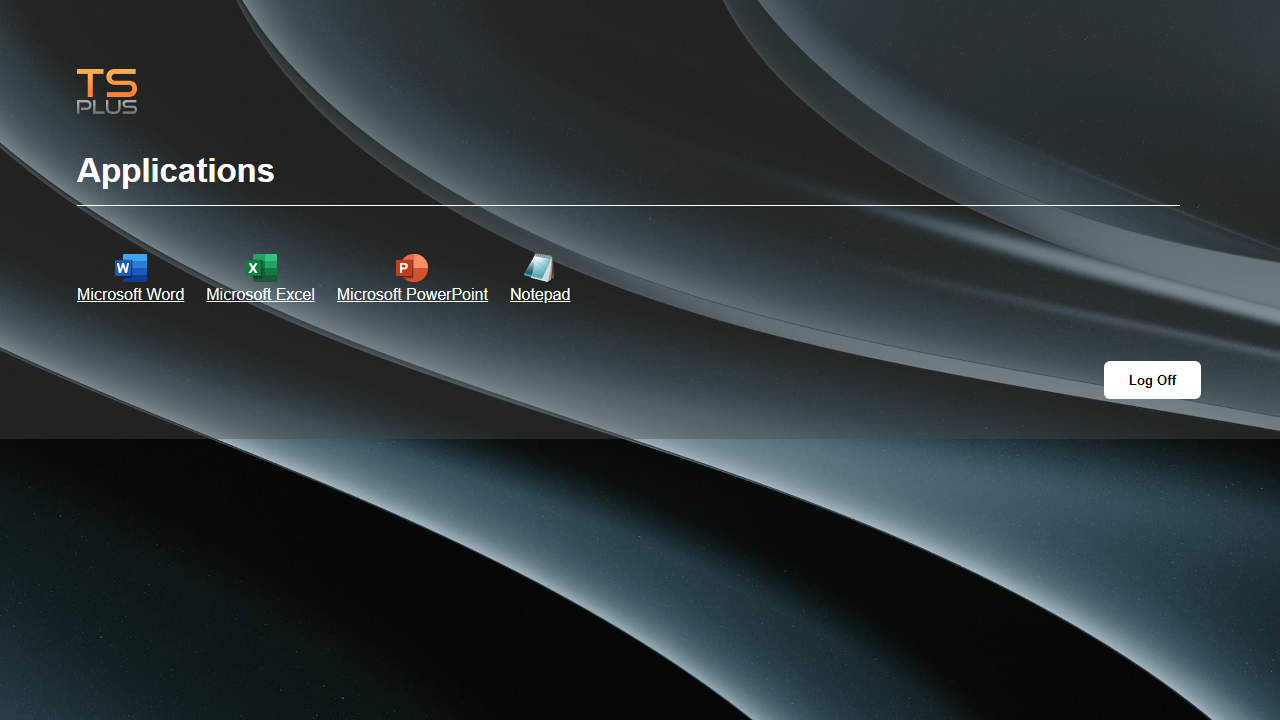
An engineer wants to script a line-of-business app delivered as a streamed Windows session into the browser. In the wild that is SAP GUI, Oracle E-Business Suite Forms, JD Edwards EnterpriseOne, Epic Hyperspace, Bloomberg Terminal or AutoCAD — published through Citrix, VMware/Omnissa Horizon, Microsoft AVD, TSplus, Cameyo, Kasm or Apache Guacamole. The browser-side result is identical across all of them: one <code><canvas></code> painted from a WebSocket. Our publicly-reachable proof point is the TSplus demo (demo / demo, no card, no sales call) driving Microsoft Excel — we ask it to type "Hello world" into A1 and read it back, and run that script against the same canvas-streaming plumbing any of the enterprise targets above use.
Outcome
Playwright recording (40 s)
AIVA recording (same task — 2× speed)
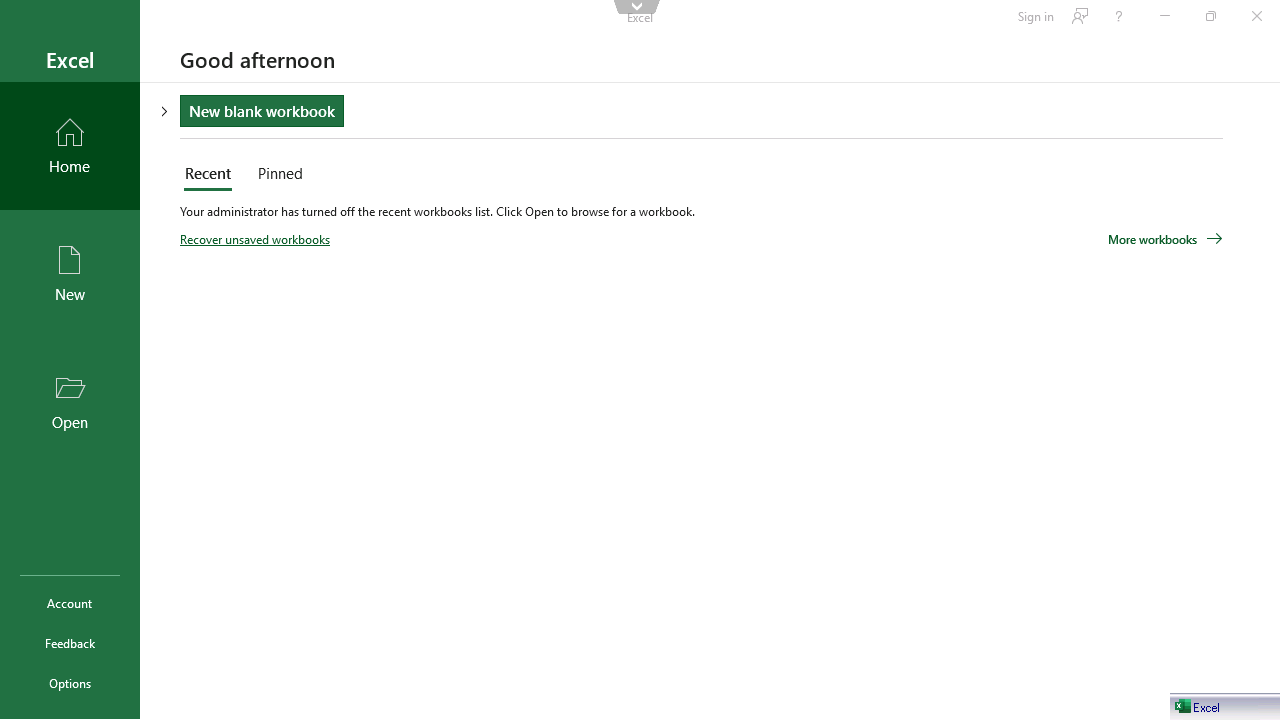
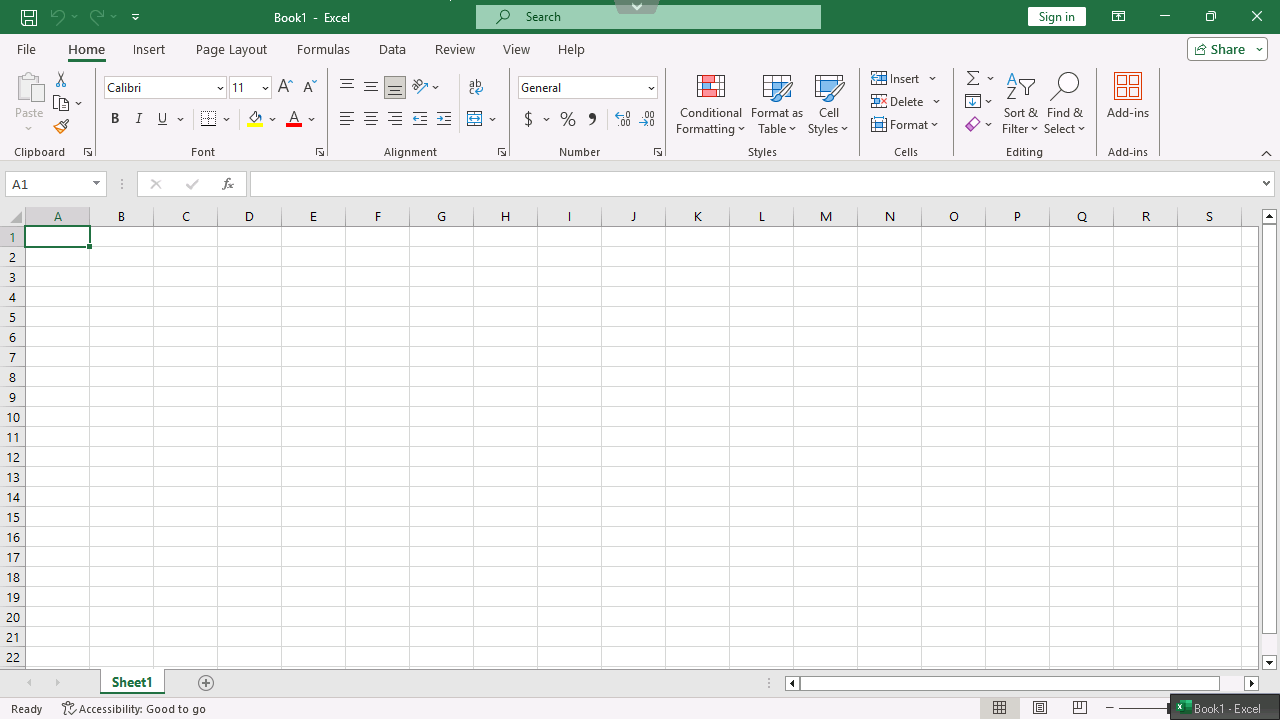
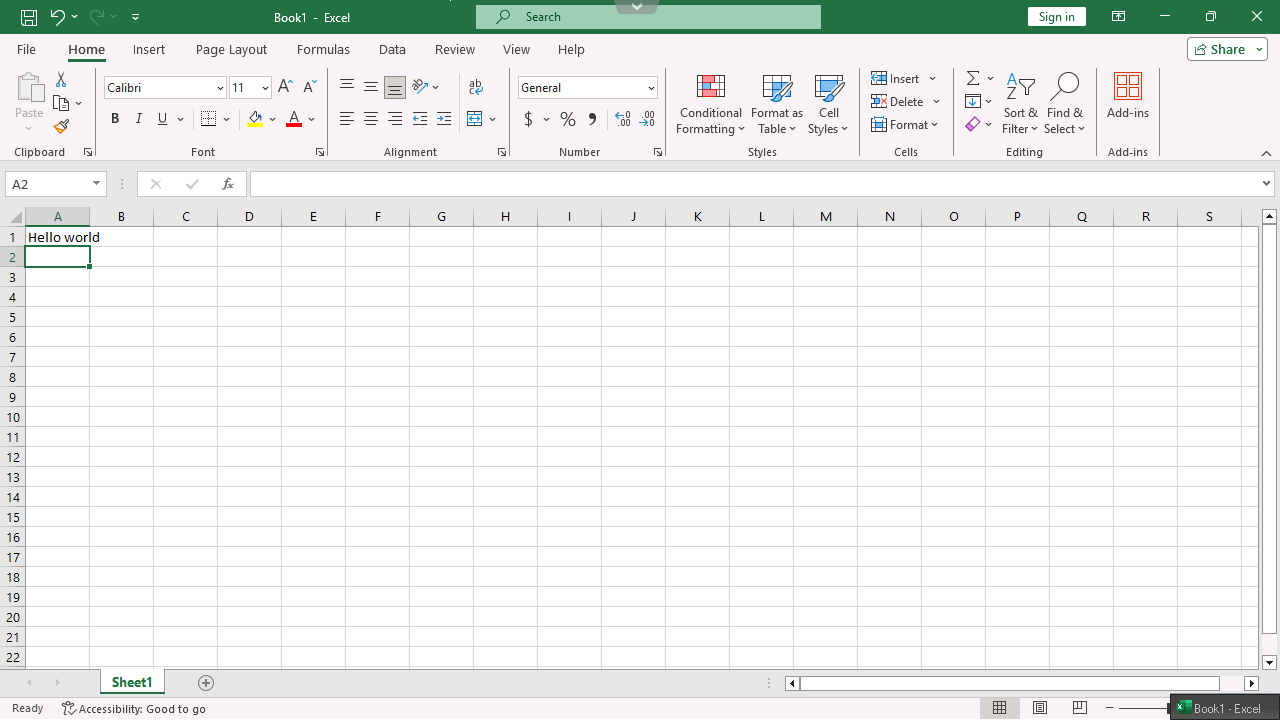
AIVA driving the same TSplus-streamed Excel session end-to-end — clicking "Blank workbook" on the Start screen as a recognised tile, targeting cell A1 as a cell, typing "Hello world", then reading it back from the rendered grid. The eight Playwright walls (no DOM tile, no tabindex on the canvas, no DOM cell, no readback path without clipboard sync) do not apply: AIVA reads the pixels the same way a human operator does, so streamed RDP, Citrix HDX, VMware Blast, Horizon HTML Access and Microsoft AVD all collapse to the same input.
How and why
Steps
- Open https://demo.tsplus.net/ and log in with demo / demo.
- Click the "Microsoft Excel" tile in the published-apps portal.
- Wait for the HTML5 RDP canvas to mount in the new tab.
- Dismiss the Excel Start screen and land on a blank Book1.
- Select cell A1.
- Type "Hello world" and press Enter.
- Read A1 back and assert it equals "Hello world".
Problem
Enterprise software is routinely delivered to the user's browser as a streamed Windows desktop — for data-sovereignty (data never leaves the datacentre or cloud region), for license-floating (concurrent vs. named-user ISV pricing), for compliance audit trails, and because decades-old Windows-only fat clients like SAP GUI, Oracle EBS Forms, Epic Hyperspace or AutoCAD will not be rewritten. Whether the bytes arrive via Citrix HDX, VMware/Omnissa Horizon Blast, PCoIP, Microsoft RDP-over-HTML5, TSplus, Cameyo, Kasm or Apache Guacamole, the browser-side result is the same: a single <canvas> (sometimes a <video>) driven over a WebSocket. No DOM, no ARIA, no document.querySelector.
Variant A — naive DOM-based drive (the real Playwright result). A developer asked to "type Hello world into A1 of Excel" would reach for getByText("Blank workbook").click(), then getByRole("gridcell", { name: "A1" }).fill(...), then expect(...).toHaveText("Hello world"). Every locator resolves to zero matches because the entire Excel UI — Start screen tiles, ribbon, formula bar, grid — is canvas pixels. toBeVisible() times out on the first selector. The recording on this card is exactly that run. This is the real result for any streamed-desktop session, not a Playwright skill issue.
Variant B — pixel-coordinate hack (NOT a real solution). Abandon selectors entirely and drive the canvas with hard-coded pixel coordinates, Office shortcuts, and the TSplus clipboard-sync side channel. It "passes" — but only because we knew, ahead of time and specifically for this Excel build at 1280×720:
(i) where the Blank-workbook tile sits in the canvas,
(ii) that pressing Escape twice closes the Office 2019+ Start screen,
(iii) where A1 sits in the canvas at this DPI / ribbon / font,
(iv) that demo.tsplus.net redirects the remote Windows clipboard back to the browser, AND that we granted clipboard-read permission for the origin.
Change any one of those four prior-knowledge inputs and Variant B breaks. Cost it out at scale: every Excel version, every theme, every DPI multiplier, every Office locale needs its own per-pixel calibration — and most production Citrix / Horizon / AVD deployments disable remote-clipboard sync by policy (it's the exfiltration vector compliance teams are closing), so (iv) does not even hold. Variant B is the upper bound of what selector-based automation can do here. It is not a generalisable approach — it is a brittle, app-version-specific pixel hack.
The streamed-desktop pattern reduces to the same problem regardless of broker: SAP GUI in Citrix XenApp, Hyperspace in Horizon, AutoCAD in AVD, JD Edwards through TSplus — all collapse to pixels in a canvas. The Playwright wall is in the same place for all of them.
Where Playwright bounces off
- ✓ Reaches Streaming-broker portal — login form, published-apps grid
Citrix StoreFront, Horizon HTML Access, Microsoft RD Web Access, TSplus Web Portal — all render as real DOM. Standard locators work for username / password / tile click. TSplus has one gotcha worth flagging:
#buttonLogOn.onclickis only attached after thecgi-bin/hb.exe2FA-status XHR returns, so the spec must Tab between fills and wait for that response before clicking. - ✓ Reaches HTML5 streaming canvas — keyboard/mouse forwarding
JWS (TSplus), Citrix HTML5 Workspace, Horizon HTML Access, Apache Guacamole and AWS WorkSpaces Web Access all forward keystrokes and mouse events over WebSocket to the remote session — but only after a
page.mouse.click()on the canvas. The canvas has notabindex, solocator('canvas').focus()does nothing; the mousedown gesture is the only path. Every subsequent click is a pixel coordinate against a layout we cannot inspect. - · No DOM Streamed application UI — every menu, dialog, dropdown, grid cell
Excel ribbon, SAP GUI transaction codes, Hyperspace patient-chart tabs, AutoCAD command line — all painted.
getByText,getByRole,locator('[aria-label=…]')→ zero matches inside the streaming canvas. Dismissing the Excel Start screen in our demo requires pressing Escape (Office 2019+ shortcut) because the "Blank workbook" tile click registered as a hover-tooltip — the canvas pixel rendered, but the activation event was lost in our first runs. - ✗ Stops here Verification — reading any value back from the streamed app
No DOM, no ARIA, no
inputValue. The only working readback isCtrl+C → navigator.clipboard.readText()via remote-clipboard sync — which requires both the host enabling clipboard redirection AND the browser context being grantedclipboard-read. The TSplus demo permits it; most production Citrix / Horizon / AVD policies disable clipboard redirection precisely because it's the data-exfiltration vector compliance teams are trying to close.
AIVA reads the canvas pixels the way a human operator does — a tile is a thing it can recognize, a cell is a cell, a transaction code in SAP GUI is text it can locate on screen. Streamed RDP, Citrix HDX, VMware Blast, Microsoft AVD, browser-rendered SaaS — all collapse to the same pixel input.
Show the Playwright test expand collapse
import { test, expect } from '@playwright/test';

const SUT = 'https://demo.tsplus.net/';

// Variant A — naive DOM-based drive. This is the real Playwright result
// against a streamed-desktop session. Every locator inside the canvas
// returns zero matches; toBeVisible() times out on the first one.
test('A. naive — DOM selectors against the canvas', async ({ page, context }) => {
  // ... login + open Excel tile (real DOM, works fine — see full source) ...
  // ... canvas#JWTS_myCanvas mounts, Excel paints its Start screen inside ...

  // First selector a developer would write — match the visible tile label.
  // The "Blank workbook" tile IS rendered (visible to a human, visible in
  // the screenshot), but it is painted into the canvas. getByText finds
  // zero elements; toBeVisible times out.
  const blankTile = appPage.getByText(/^Blank workbook$/i).first();
  await expect(blankTile).toBeVisible({ timeout: 10_000 });   // ← FAILS HERE
  await blankTile.click();

  // Unreachable in practice — included so a reader can see the next two
  // naive selectors a developer would write and confirm they too resolve
  // to zero matches against the canvas:
  const a1Cell = appPage.getByRole('gridcell', { name: 'A1' })
    .or(appPage.locator('[aria-label="A1"]'));
  await expect(a1Cell).toBeVisible({ timeout: 10_000 });
  await a1Cell.fill('Hello world');
  await expect(a1Cell).toHaveText('Hello world');
});

// Variant B — pixel-coordinate hack. Kept to be candid about what it
// would take to "drive" Excel-on-canvas from stock Playwright. Requires
// four pieces of app-version-specific prior knowledge:
//   (i)   Blank-workbook tile pixel coords at 1280x720
//   (ii)  Escape × 2 closes Office 2019+ Start screen
//   (iii) A1 pixel coords at this DPI/theme/ribbon
//   (iv)  Host redirects the remote clipboard AND clipboard-read granted
// Change any one and Variant B breaks. This is the upper bound of what
// selectors can do — not a generalisable approach.
test('B. best-effort — pixel coords + Office shortcut + clipboard sync', async ({ page, context }) => {
  await context.grantPermissions(['clipboard-read', 'clipboard-write'], {
    origin: 'https://demo.tsplus.net',                          // (iv)
  });
  // ... same login + open Excel tile ...
  const box = (await canvas.boundingBox())!;

  // (i) tile pixel. Click neutral whitespace first for the JWS input gesture.
  await appPage.mouse.click(box.x + 640, box.y + 700);

  // (ii) Escape twice — Office 2019+ shortcut to close the Start screen.
  await appPage.keyboard.press('Escape');
  await appPage.waitForTimeout(1_500);
  await appPage.keyboard.press('Escape');
  await appPage.waitForTimeout(6_000);

  // (iii) A1 by hardcoded canvas pixel. Belt-and-braces Ctrl+Home.
  await appPage.mouse.click(box.x + 58, box.y + 237);
  await appPage.keyboard.press('Control+Home');
  await appPage.keyboard.type('Hello world', { delay: 60 });
  await appPage.keyboard.press('Enter');

  // (iv) Readback via clipboard side channel — the ONLY working path.
  await appPage.keyboard.press('Control+Home');
  await appPage.keyboard.press('Control+C');
  await appPage.waitForTimeout(800);
  const clip = await appPage.evaluate(() => navigator.clipboard.readText());
  expect(clip.trim()).toBe('Hello world');
});
TimeoutError: expect(locator).toBeVisible() failed — Locator: getByText(/^Blank workbook$/i).first(). Expected: visible. Error: element(s) not found. "Excel Start-screen 'Blank workbook' tile should be reachable from the DOM — it is not, because the Start screen is painted into the canvas."
The pattern, at scale
900M+
monthly users on a canvas-rendered spreadsheet
Google Sheets alone; Microsoft Excel adds another 750M+ (Microsoft, 2017 baseline), Smartsheet runs at 85% of Fortune 500. Google Docs migrated to canvas in May 2021 and broke a swathe of Chrome extensions in the process — selector tools only see the chrome around the grid.
The category
71%
of FP&A teams own EPM tools — and still run on spreadsheets
2025 AFP FP&A Benchmarking Survey. A separate 700-leader survey: 40% of businesses still manage half their financial data manually; 26% manage the majority manually (FinTech Strategy, 2025). Spreadsheets stay the de facto ERP surface — and vendors ship canvas spreadsheets to plug the gap.
Our exemplar
13M+
Odoo users — the canvas-ERP pattern with a public trial
40% YoY growth, 7,000 new clients/month, €5 billion valuation (Odoo SA, Nov 2024). ~15% of the SMB ERP market, projected 25% by 2027. Their Spreadsheet ships in every Enterprise edition — and the free trial lets us demonstrate the failure publicly, against a real grid, without violating anyone's terms.
Exemplar · live demo
Add a purchase order to Odoo Spreadsheet
Open-source ERPhttps://testforme.odoo.com/odoo
Goal
A procurement clerk needs to record a new incoming order — PO-2026-3123, 700 units of RM-3002 (Stainless 316L bar) from NorthSteel Foundry, due 2026-05-22, status Draft — in the company's Odoo Spreadsheet ERP workbook.
Outcome
Playwright recording (23 s)
AIVA recording (same task — 2× speed)
AIVA driving the same Odoo Spreadsheet task end-to-end — selecting the TOTAL row, inserting the row above, typing the ten Purchase Order cells across, and verifying the result — by looking at the rendered pixels the same way a human operator does.
Show AIVA's step-by-step run log
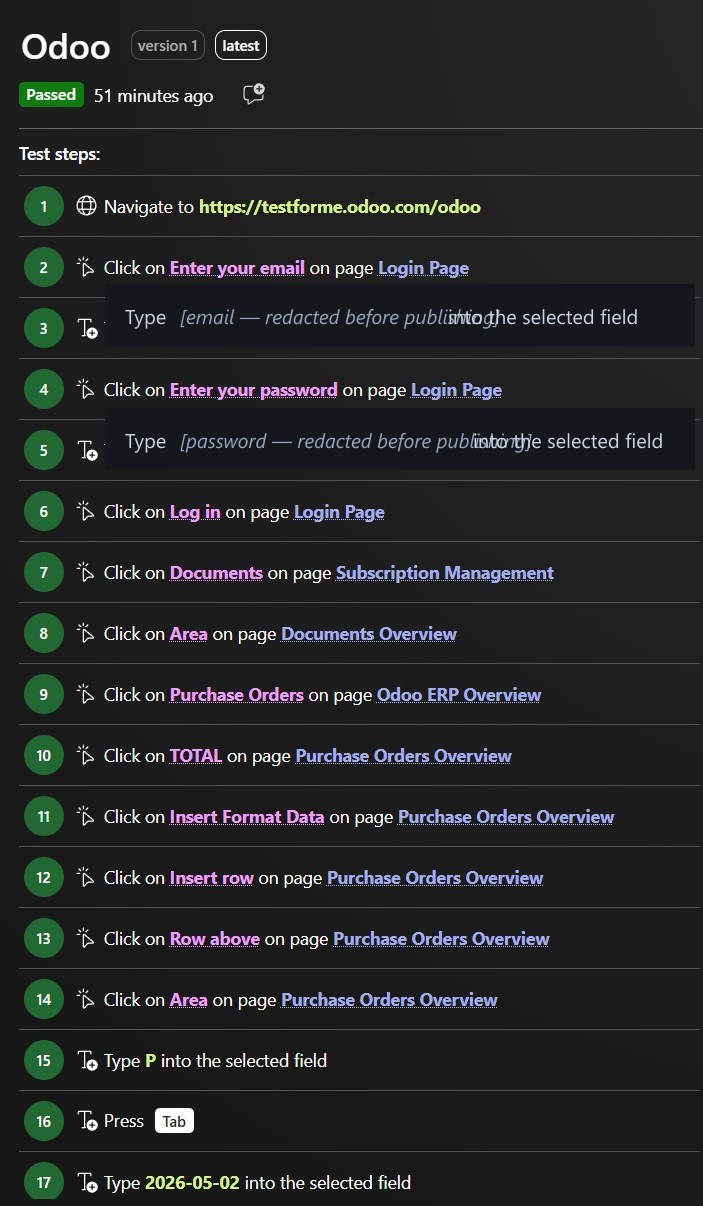
The AIVA test-run log records every step it took on the canvas — clicking "TOTAL", opening Insert → Row above, typing each value, pressing Tab. The screenshot is exported from AIVA's test-runs viewer. Login credentials have been redacted for publication.
How and why
Steps
- Log in to Odoo and open the ERP workbook in the Documents app.
- Navigate to the Purchase Orders register.
- Open a new row above the TOTAL line for the incoming order.
- Fill in PO #, order date, supplier, SKU, description, qty, unit cost, net total, expected receipt and status.
- Save and verify the order was recorded.
Problem
The spreadsheet renders to a single <canvas>, and the chrome around it (Name Box, menus, formula bar) uses class names Odoo wraps differently from the o-spreadsheet library docs. Playwright never reaches the canvas — it can't get past the chrome.
Where Playwright bounces off
- ✓ Reaches Outer Odoo DOM — login form, Documents app, file card
Standard locators work here:
input[name="login"],.o_kanban_record, the Documents nav link. This is what the recording shows succeeding for the first ~10 seconds. - ✗ Stops here o-spreadsheet chrome — Name Box, top-bar menus, sheet tabs, formula bar
The library docs claim
.o-name-box,.o-topbar-menu,.o-sheet,.o-formula-bar. Odoo's wrapped build exposes none of them — every documented selector resolves to zero elements. The test stops here, timing out on the first Name-Box click. - · No DOM <canvas> grid — every cell, gridline, total, conditional fill
Painted into a single canvas element with no DOM children. Even if a future test author reverse-engineers the chrome selectors, no per-cell locator exists; verification has no DOM surface to assert against.
AIVA reads all three layers as rendered pixels — the layer separation doesn't apply. Login form, sheet tabs, and grid cells are visually identical inputs to the same vision model.
Show the Playwright test expand collapse
import { test, expect, type Page } from '@playwright/test';

const START_URL = 'https://testforme.odoo.com/odoo';
const EMAIL = process.env.ODOO_EMAIL!;
const PASSWORD = process.env.ODOO_PASSWORD!;
const FILE_NAME = 'odoo-erp-mock';
const TOTAL_ROW_REF = 'A15';
const NEW_ROW_VALUES = [
  'PO-2026-3123', '2026-05-02', 'NorthSteel Foundry', 'RM-3002',
  'Stainless 316L bar — 60mm', '700', '14.20', '9940.00',
  '2026-05-22', 'Draft',
] as const;

test('insert a row in Purchase Orders, fill it, verify', async ({ page }) => {
  test.setTimeout(180_000);

  // 1. Log in
  await page.goto(START_URL);
  if (page.url().includes('/web/login')) {
    await page.locator('input[name="login"]').fill(EMAIL);
    await page.locator('input[name="password"]').fill(PASSWORD);
    await page.getByRole('button', { name: /log in/i }).click();
    await page.waitForURL((u) => !u.pathname.startsWith('/web/login'));
  }

  // 2. Open Documents → odoo-erp-mock.xlsx
  await page.getByRole('link', { name: /^Documents$/ }).click();
  await page
    .locator('.o_kanban_record, .o_data_row')
    .filter({ hasText: FILE_NAME })
    .first()
    .dblclick();
  await page.locator('.o-grid canvas').first().waitFor();

  // 3. Switch to Purchase Orders sheet (sheet tabs ARE real DOM)
  await page.locator('.o-sheet').filter({ hasText: /^Purchase Orders$/ }).first().click();

  // 4. Select A15 (TOTAL) and Insert → Row → Above
  await selectCellByReference(page, TOTAL_ROW_REF);
  await page.locator('.o-topbar-menu').filter({ hasText: /^Insert$/ }).first().click();
  await page.locator('.o-menu-item').filter({ hasText: /^Row(s)?$/i }).first().click();
  await page.locator('.o-menu-item').filter({ hasText: /Row\s+above/i }).first().click();

  // 5. Re-select A15 (now empty) and type ten cells across
  await selectCellByReference(page, TOTAL_ROW_REF);
  for (let i = 0; i < NEW_ROW_VALUES.length; i++) {
    await page.keyboard.type(NEW_ROW_VALUES[i], { delay: 20 });
    await page.keyboard.press(i < NEW_ROW_VALUES.length - 1 ? 'Tab' : 'Enter');
  }

  // 6. Verify: re-select A15 and read the formula bar
  await selectCellByReference(page, TOTAL_ROW_REF);
  const composer = page
    .locator('.o-spreadsheet-topbar .o-composer, .o-formula-bar')
    .first();
  const value = (await composer.textContent())?.trim() ?? '';
  expect(value).toBe(NEW_ROW_VALUES[0]); // ← fails: returns "" under headless timing
});

// Name Box: real-DOM <input> at top-left of the grid that selects a cell
// by A1-reference. The only navigation path that works without per-cell DOM.
async function selectCellByReference(page: Page, ref: string) {
  const nameBox = page.locator('.o-name-box input, [class*="name-box"] input').first();
  await nameBox.click();
  await page.keyboard.press('ControlOrMeta+A');
  await page.keyboard.type(ref);
  await page.keyboard.press('Enter');
  await page.waitForTimeout(80);
}
TimeoutError: locator.click: Timeout 15000ms exceeded. waiting for locator('.o-name-box input, [class*="name-box"] input, …').first()
Live demo
Sign in to SAP Business One Cloud with a Google account
SaaS gatewayhttps://www.business-one.cloud/en/
Goal
A prospect wants to evaluate SAP Business One Cloud using their company Google Workspace identity — Login → "Sign in with Google" → land on the authenticated dashboard. The same flow a sales engineer would script before showing the product to a customer.
Outcome
Playwright recording (30 s)
AIVA recording (same task — 2× speed)
AIVA driving the exact same flow end-to-end on a real desktop browser — clicking Login on business-one.cloud, choosing Google on the B2C popup, typing the email and password, landing on the authenticated SAP B1 dashboard. Neither Google wall fires. The fingerprint check sees a normal desktop Chrome and passes silently; the risk engine doesn't escalate to the reCAPTCHA "Verify it's you" step at all — so AIVA never has to read an image grid or click any tile, because no challenge is ever served. The eight Playwright variants tripped Google's detector before the password screen; AIVA is invisible to that detector in the first place, so the entire challenge surface stays dormant.
How and why
Steps
- Open https://www.business-one.cloud/en/.
- Click "Login" — a Microsoft B2C popup opens.
- Choose "Google" on the B2C social-sign-in panel.
- On accounts.google.com, fill the email and click Next.
- Fill the password and click Next.
- Land on the authenticated SAP Business One Cloud dashboard.
Problem
SAP Business One Cloud itself is fine — its Login link is a plain anchor, and the Microsoft B2C popup that opens is a regular form with named buttons. The "Sign in with Google" button is the cliff edge: from there, the flow is owned by accounts.google.com, and Google's anti-automation engine runs two consecutive checks before SAP B1 ever loads.
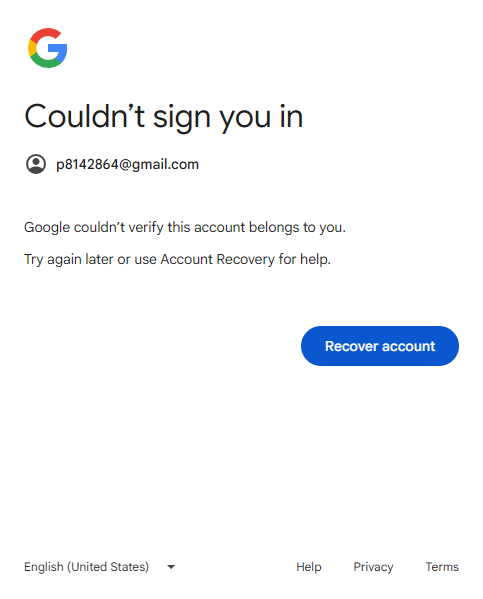
Stage 1 — browser fingerprint check (email step). Google inspects navigator.webdriver, the plugin / mime-type arrays, navigator.languages, the window.chrome object surface, the WebGL vendor/renderer string, hardwareConcurrency / deviceMemory, the Permissions API's behaviour, the Battery API, and at the launch level whether the browser was started with --enable-automation or exposes a DevToolsActivePort file. Any single tell → "Couldn't sign you in — this browser or app may not be secure." The password field never appears.
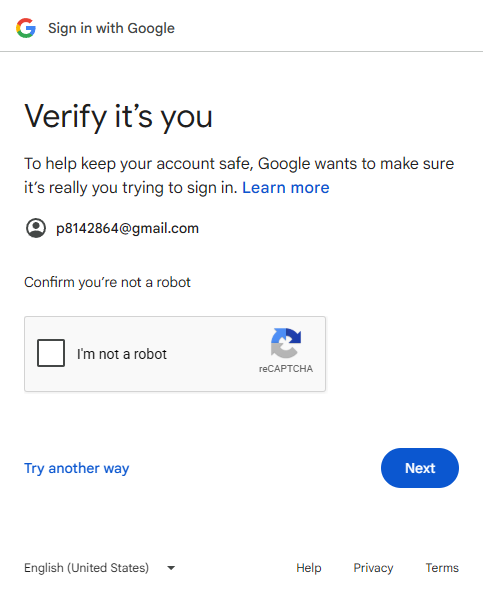
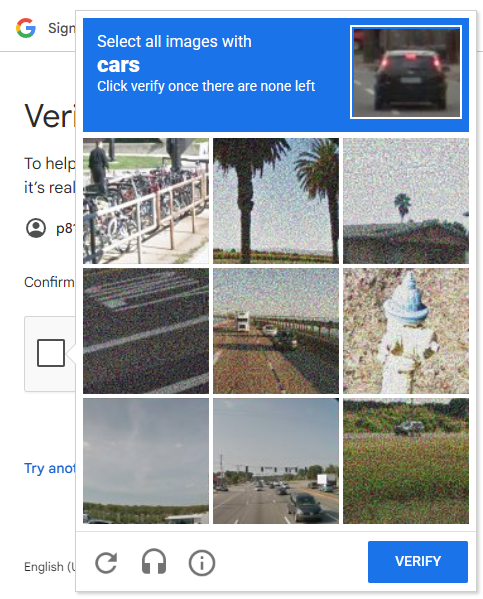
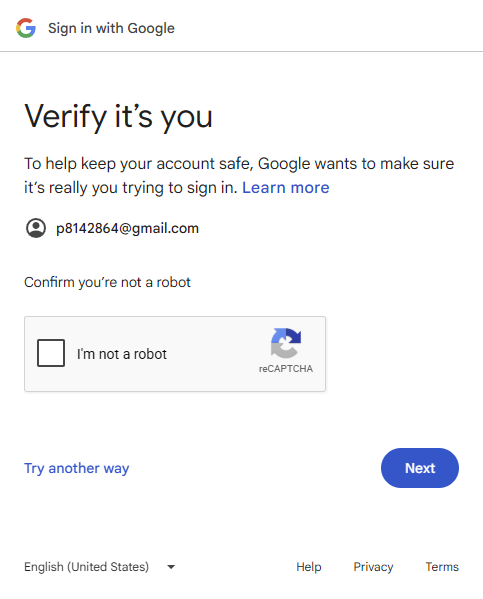
Stage 2 — reCAPTCHA "Verify it's you" (post-email). If the fingerprint check passes, Google runs a risk score (cookie age, IP reputation, mouse-movement entropy, and Stage-1 signals as inputs) and chooses whether to silently pass the "I'm not a robot" checkbox or escalate to the image grid ("Select all squares with fire hydrants"). The image grid is <canvas> inside a Google-owned iframe; the answer is image classification, unsolvable from the DOM. The SAP B1 dashboard is never reached.
Where Playwright bounces off
- ✓ Reaches business-one.cloud marketing site + Microsoft B2C selector
Standard locators work here:
getByRole('link', { name: 'Login' })opens the B2C popup;getByRole('button', { name: 'Google' })launches the federated flow. This is what the recording shows succeeding for the first ~6 seconds. - ✗ Stops here accounts.google.com · Stage 1 — automation fingerprint check
Inspected at the email-submit step. No matter how thorough the in-page stealth init script is, certain signals (launch flags, DevToolsActivePort presence, CDP-protocol attach pattern) leak through and route the session to
/signin/rejected. The password field is never reached. - ✗ Stops here accounts.google.com · Stage 2 — reCAPTCHA "Verify it's you"
When Stage 1 passes (real Chrome via
channel: 'chrome'orconnectOverCDP), Google escalates to "Verify it's you · Confirm you're not a robot". Even a high-trust profile gets the image grid;getByText('fire hydrant')resolves to zero elements because the tiles are painted into a canvas inside a Google iframe. - · No DOM Behind the wall — SAP Business One web client, app modules, ERP data
Never reached. Every Playwright variant stops on Google's side; the actual SAP B1 surface (the thing the test was supposed to drive) is unobservable from selector-based automation.
AIVA drives a real desktop browser, not a WebDriver-controlled one — Stage 1 doesn't apply. For Stage 2 it reads the image grid the same way a human does (rendered pixels) and clicks the matching tiles.
Attempts log every pure-Playwright escalation we tried, in order
| # | Variant | What changed vs. previous | Stopped at |
|---|---|---|---|
| A | Naive headless
view source
| Default chromium, default UA, no flags | Fingerprint reject Lands on |
| B | Real Chrome channel
view source
| A + channel: 'chrome' + Win10 Chrome UA + --disable-blink-features=AutomationControlled | reCAPTCHA · checkbox Fingerprint check passes. Lands on "Verify it's you" with the reCAPTCHA "I'm not a robot" checkbox. |
| C | Stealth init script
view source
| A + addInitScript: delete navigator.webdriver, fake plugins / mimeTypes, restore window.chrome.runtime, override navigator.languages / Permissions API | Fingerprint reject Same as A — the stealth surface is not enough on its own without a real Chrome binary underneath. |
| D | Human cadence
view source
| C + per-character typing delay 60–180 ms, mouse drift to element centroid before each click, occasional thinking pauses | Fingerprint reject Identical to A / C. Google flags before any human behavioural signal can register. |
| E | Persistent profile
view source
| B + chromium.launchPersistentContext({ userDataDir }) so cookies and history accumulate between runs | reCAPTCHA · checkbox Same wall as B. An empty-then-warmed profile doesn't accumulate enough trust in one session. |
| F | Click the reCAPTCHA checkbox
view source
| E + frameLocator('iframe[src*="/recaptcha/"]').click("I'm not a robot") | reCAPTCHA · image grid Image grid opens — "Select all squares with fire hydrants". Tiles are |
| G | CDP attach to external Chrome
view source
| chromium.connectOverCDP() to a Chrome launched manually with --remote-debugging-port — not via Playwright, so the WebDriver-launch signature (--enable-automation, DevToolsActivePort file) never gets set | reCAPTCHA · checkbox Past Stage 1 — but Stage 2 still fires. The launch-time signature was the last residual sub-fingerprint that B / E couldn't hide. |
| H | CDP + warmup + comprehensive stealth
view source
| G + 30 s behavioural warmup (google.com search → YouTube → accounts.google.com) + comprehensive init script: WebGL vendor/renderer (Intel Inc. / ANGLE), hardwareConcurrency = 8, deviceMemory = 8, navigator.platform, navigator.connection, Battery API stub, Permissions notifications = Notification.permission. Bezier mouse trajectories + variable typing. | reCAPTCHA · checkbox Strongest pure-Playwright cloak available. Still "Verify it's you". Google's wall holds. |
Eight variants, two distinct Google walls. The strongest pure-Playwright cloak (H) clears the fingerprint check but still triggers reCAPTCHA. Beyond H the next move is no longer a cloaking change — it's a vision model (AIVA) or a one-time human captcha solve to bootstrap a storage-state replay.
Show the Playwright test expand collapse
import { test, expect, chromium, type Page } from '@playwright/test';

const SUT_URL = 'https://www.business-one.cloud/en/';
const GOOGLE_EMAIL = process.env.GOOGLE_EMAIL!;
const GOOGLE_PASSWORD = process.env.GOOGLE_PASSWORD!;

// Shared flow. Each variant differs only in the *browser fingerprint*
// (stealth init script, real-chrome channel, persistent user-data-dir).
async function attemptGoogleSignIn(page: Page) {
  // 1. business-one.cloud — Login opens a B2C popup via window.open().
  await page.goto(SUT_URL);
  const [popup] = await Promise.all([
    page.context().waitForEvent('page'),
    page.getByRole('link', { name: /^(login|anmelden)$/i }).first().click(),
  ]);
  await popup.waitForLoadState('domcontentloaded');

  // 2. B2C social-sign-in form: LinkedIn / Microsoft / Google.
  await popup.getByRole('button', { name: /^google$/i }).click();
  await popup.waitForURL(/accounts\.google\.com/);

  // 3. Email page.
  await popup.locator('input[type="email"]').fill(GOOGLE_EMAIL);
  await popup.getByRole('button', { name: /^next$/i }).click();

  // 4. Wait for whichever wall Google chooses:
  //    - Password input (the happy path)
  //    - /signin/rejected   (headless fingerprint detected)
  //    - reCAPTCHA iframe   (real-Chrome path, hits "Verify it's you")
  await Promise.race([
    popup.locator('input[type="password"]').waitFor({ state: 'visible' }),
    popup.getByText(/couldn't sign you in/i).waitFor(),
    popup.frameLocator('iframe[src*="/recaptcha/"]').first().locator('body').waitFor(),
  ]);
  return popup;
}

test('A. naive — default chromium, default UA', async ({ page }) => {
  const opened = await attemptGoogleSignIn(page);
  expect(opened.url()).toMatch(/business-one\.cloud/); // ← fails on /signin/rejected
});

test('B. real-chrome — channel: chrome + Win10 UA', async () => {
  const browser = await chromium.launch({
    channel: 'chrome',
    headless: false,
    args: ['--disable-blink-features=AutomationControlled'],
  });
  const context = await browser.newContext({
    userAgent: 'Mozilla/5.0 (Windows NT 10.0; Win64; x64) ... Chrome/132.0.0.0 ...',
  });
  const page = await context.newPage();
  const opened = await attemptGoogleSignIn(page);
  expect(opened.url()).toMatch(/business-one\.cloud/); // ← fails on reCAPTCHA
});

// Variants C (stealth init script) and D (jittered typing) hit the
// same /signin/rejected wall as A. Variants E (persistent user-data-dir)
// and F (click "I'm not a robot") hit the same image-grid challenge as B.
Error: naive variant should have landed on business-one but ended on https://accounts.google.com/v3/signin/rejected?idnf=p8142864%40gmail.com…